Go Code Gen
Go Code Gen
The "Go Code Gen" extension allows you to generate a fully operational Go server with Protobuf integration to manage your application's data layer based on the defined data model.
In the extensions panel, click on the "Go Code Gen" extension. A modal window will appear with the configuration settings:
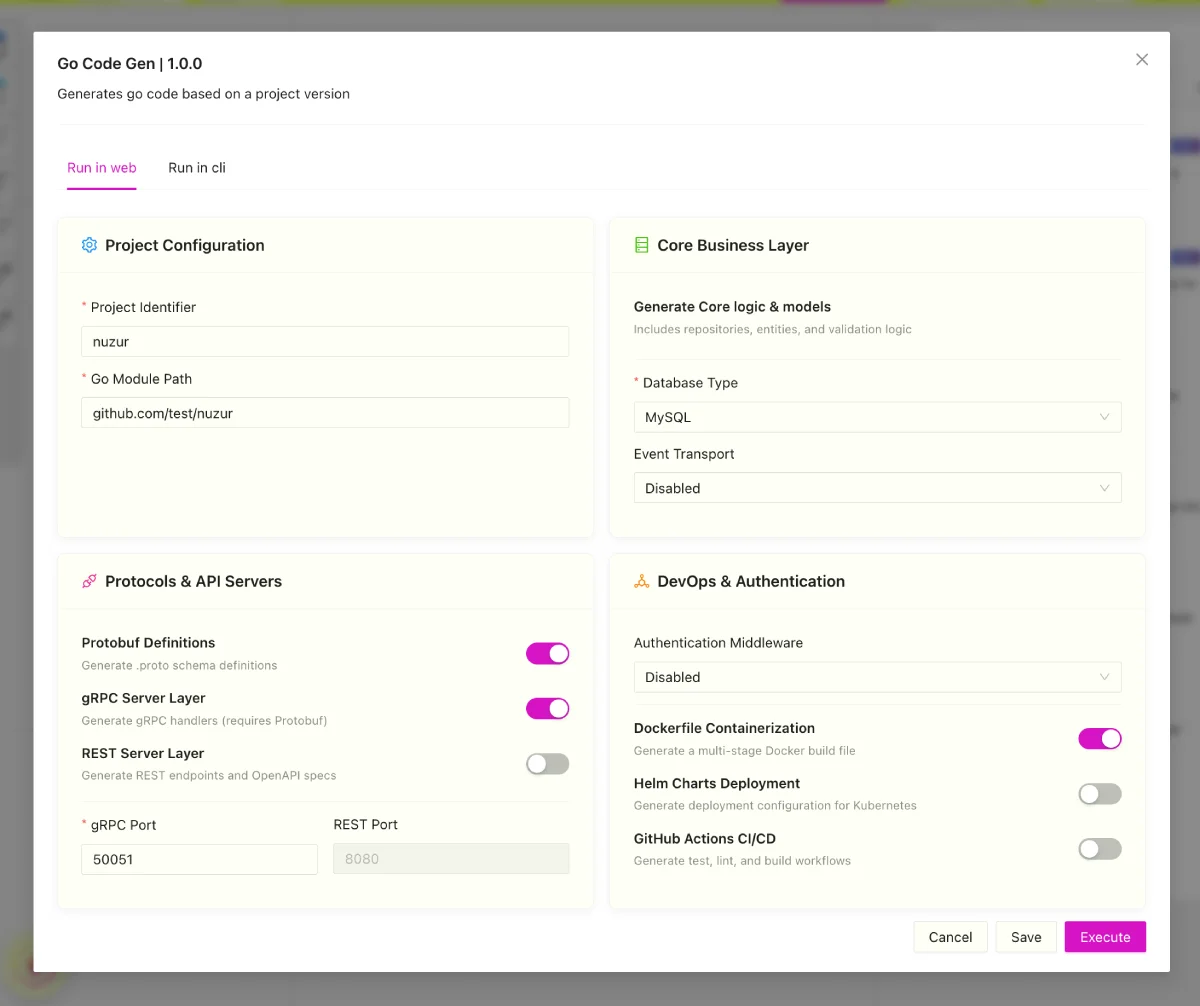
- Project Configuration:
- Project Identifier: The unique name or identifier for this generated project.
- Go Module Path: The Go module path for Go packages (e.g.,
github.com/username/project).
- Core Business Layer:
- Generate Core logic & models: Automatically enabled to generate your database entities, repositories, and validation rules.
- Database Type: Select the target database engine:
MySQLorPostgreSQL. - Event Transport: Optional event system broker (
DisabledorApache Kafka) to stream data change notifications.
- Protocols & API Servers:
- Protobuf Definitions: If enabled, generates
.protoschema definitions for your entities. - gRPC Server Layer: If enabled, generates type-safe gRPC service handlers (requires Protobuf).
- REST Server Layer: If enabled, generates standard HTTP REST endpoints and OpenAPI specification files.
- gRPC Port: The network port where the gRPC server will listen (defaults to
50051). - REST Port: The network port where the REST HTTP server will listen (defaults to
8080).
- Protobuf Definitions: If enabled, generates
- DevOps & Authentication:
- Authentication Middleware: Configures auth middleware for endpoints (
Disabled,JWT (JSON Web Token), orKeycloak OpenID). - File Storage: On or off, plus the object store to use. When enabled, the generated backend exposes
/uploadand/signendpoints backed by Amazon S3 or Cloudflare R2. See File storage. - Dockerfile Containerization: If enabled, generates a multi-stage Docker build file for containerizing the Go service.
- Helm Charts Deployment: If enabled, generates Kubernetes Helm chart files in a
.helmfolder. - GitHub Actions CI/CD: If enabled, generates continuous integration configuration files for GitHub Actions.
- Authentication Middleware: Configures auth middleware for endpoints (
Once configured and executed, the code generator:
- Validates base model dependencies.
- Generates the Go code structure, Protobuf schemas, database query managers, Docker/Helm configurations, and CI/CD pipelines.
- Compresses the complete server project into a ZIP file.
- Generates a download link for you to retrieve the code.
Run via CLI
You can also run the Go Code Gen extension directly on your machine using the nuzur CLI. This writes the generated server project files directly to your local filesystem without requiring you to download a ZIP archive from the browser:
nuzur-cli go-code-gen
The CLI will guide you to select your project, version, configuration settings, and the output folder where the generated files will be written.
Adding your own code
Everything above is regenerated from your model on every run, so it shouldn't be edited by hand. For the code that is yours — extra REST routes, overrides of the generated gRPC endpoints, brand-new RPCs, and background workers such as schedulers, pollers or ingest loops — the generator emits a custom application zone (the app/ folder, enabled with custom_enabled or the CLI's --custom flag). Its files are scaffolded once and survive every regeneration. See Writing custom code.