8 Things to set up right the first time when building a web app
Most developers don't regret writing more code. They regret skipping a few steps at the beginning — decisions that take minutes to make and months to undo.
In this post, I'm sharing eight things I do every time I start a new web application. Not theory, but actual steps. The kind that save you from painful refactors, lost data, and architecture rewrites six months into a project.
Check out the video version here:
Tip 1: Use containers from day one
Set up Docker before you write a single line of application code. Containerize every service, every component.
This resolves the classic "it works on my machine" problem. Your dev environment, your CI pipeline, and your production environment all behave the same way — consistently, with no surprises along the way.
It's a small upfront investment that pays off every time you onboard a new developer or spin up a new environment.
Tip 2: Keep your database separate
Never bundle your database and your application in the same container. Your application has a very different lifecycle than your database.
You might need to restart your app frequently. Your database should almost never restart. Bundling them together means every app restart risks your data layer — and every database issue takes your app down with it.
I'd go one step further and recommend a managed database service like AWS RDS. You can start at very low cost (or free if you're new to the platform), and they handle backups, migrations, failovers, and a lot of things you shouldn't be spending your time on early in a project.
Either way — managed service or separate container — the principle is the same: keep them decoupled.
Tip 3: Keep your frontend and backend separate
It might be tempting to put everything in one place early on. It feels quicker. You save a few steps.
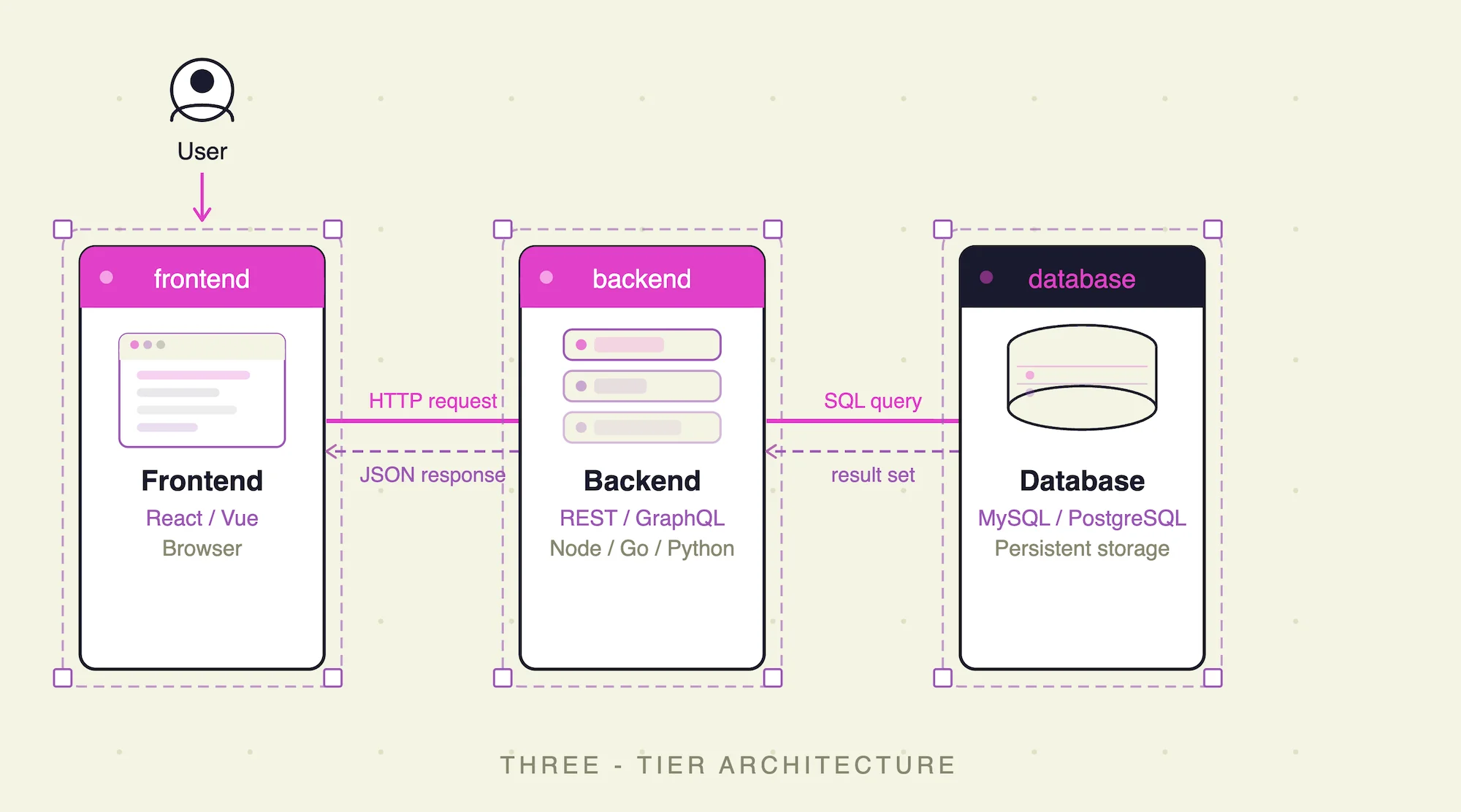
But as the project grows, you'll start mixing frontend logic with business logic, and it becomes very difficult to maintain — especially as more people join the project. There's no clear separation between layers, and that creates real coordination problems.
Keep them in at least two separate containers from the start. Future you, and your team, will be grateful.
Tip 4: Use Kubernetes even when bootstrapping
I know what you're thinking. This sounds like overkill.
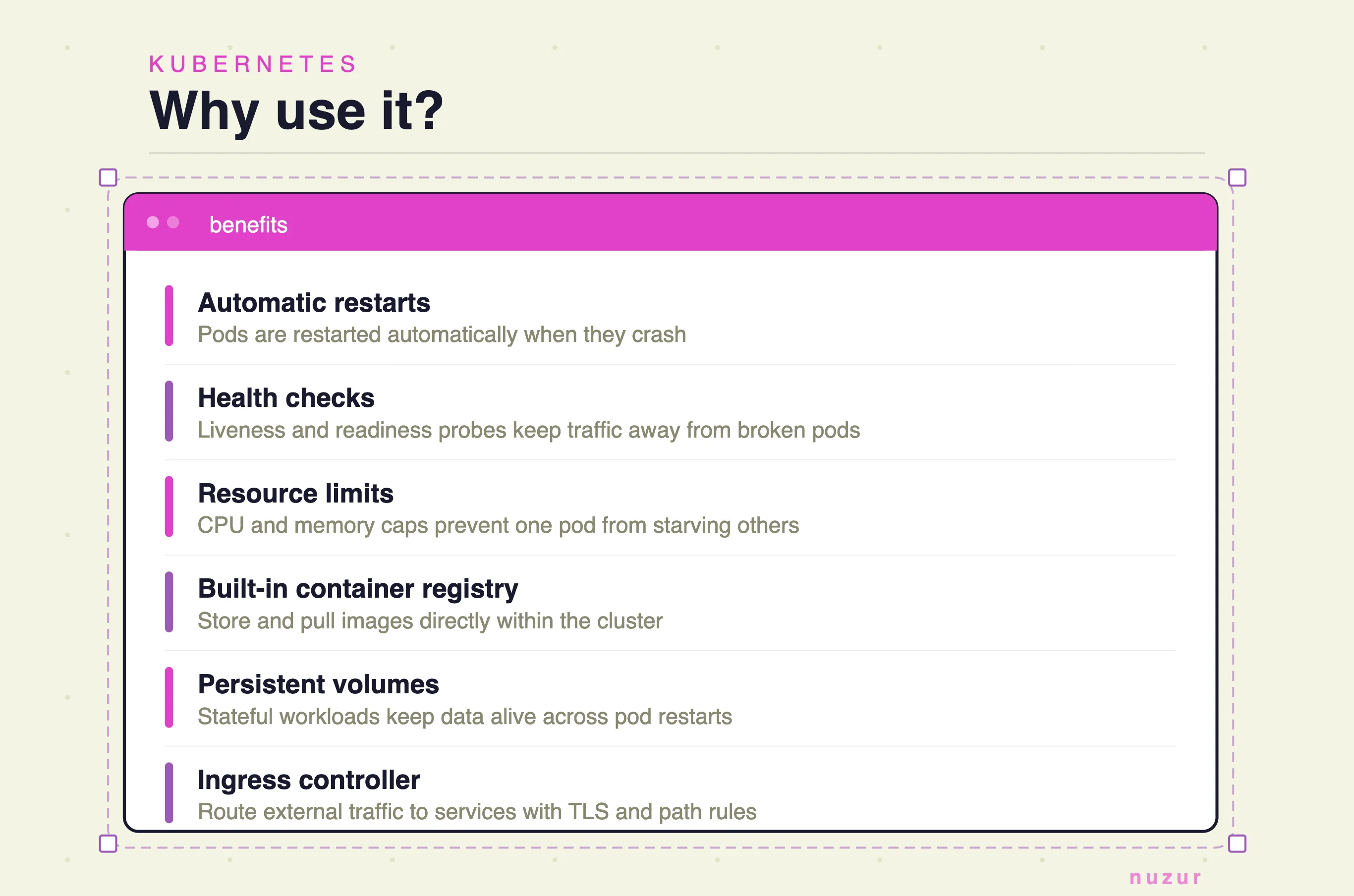
Hear me out: install MicroK8s on a single Ubuntu server and you get a full Kubernetes cluster running on one machine. You immediately get automatic restarts when a pod crashes, health checks, a container registry, an ingress controller, and more — all with minimal setup.
It's a time investment upfront, but when you're ready to scale to a larger cluster, you don't need to change how you deploy anything. It's already all connected. You just scale.
Tip 5: Let your data model drive everything
This is a principle I've held to for a long time: design the data model before writing any code.
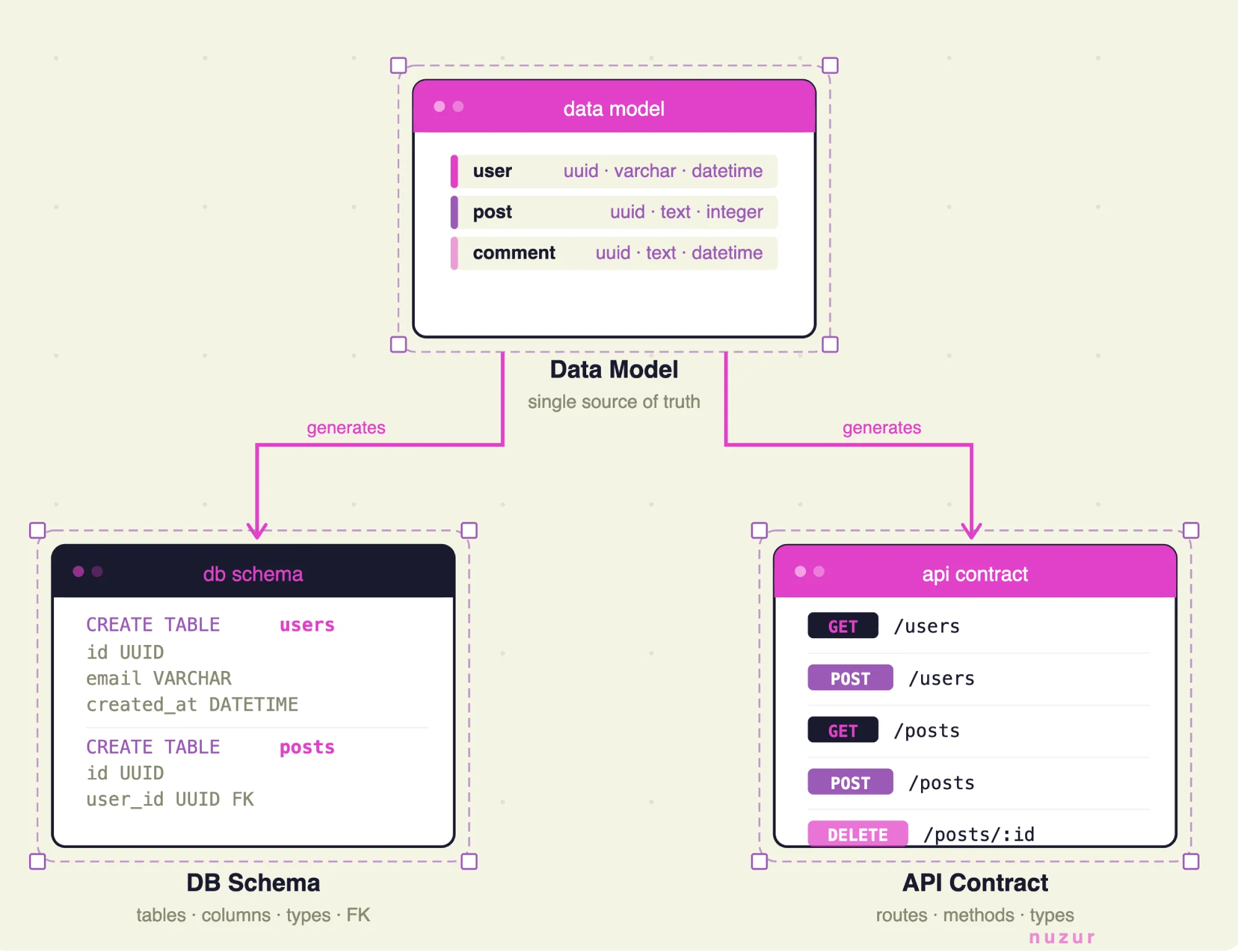
The data model defines your database schema. The schema defines the API contract. The API contract scaffolds everything else. If you get this right early, the rest of your architecture follows naturally. If you get it wrong, you'll be paying for it for the life of the project — especially once other people start depending on it.
I use nuzur for this. I model my entities visually in the editor, and once I'm happy with the structure, nuzur can sync those changes directly to the database — no manual SQL, no separate migration tool, and full version history.
From there, nuzur has an extension to generate proto definitions for the API contract, and if you're a Go developer, another extension to generate a full Go + protobuf server with CRUD operations already wired up.
Whether or not you use nuzur, the discipline is the same: model carefully, validate against your requirements, and resist the urge to start building until you're confident the entities are right. They get expensive to change once the project is live.
Tip 6: Never hardcode secrets
This one sounds obvious. It still happens constantly.
When you're testing something quickly, it's easy to drop a value directly into the code just to see if it works — and then forget about it. The problem is that git history never forgets. Once a secret is committed, it's there permanently.
Here's the practice:
- Local development: use a
.envfile, and make sure it's in your.gitignorefrom the very first commit - Kubernetes: use Kubernetes Secrets and inject them as environment variables into the pod
- Helm: you can manage this at the chart level as well
It's a simple habit. It becomes a critical one the moment you work with a larger team or accidentally make a repo public.
Tip 7: Define your backup and restore strategy before you ship
This is the step that gets skipped most often — not out of laziness, but because everyone is focused on shipping. You've been building for a while, you're excited, and backup strategy feels like something you'll handle later.
Define it before you go live. Know how frequently your data is being backed up. Know exactly how to restore to a previous state in an emergency. Understand your tolerance for data loss — it varies by project, and being intentional about it matters.
This applies to every component in your application: if you have multiple databases or different services working together, run through each one. A plan you make at 2pm on a Tuesday is a lot better than one you're improvising at 2am during an incident.
Tip 8: Use AI to review your architecture, not just generate code
We're all using AI to generate code, and it's useful for that — as long as you understand what it's producing. But there's another use case that's often overlooked: architecture review.
Once you've modeled your entities and feel good about them, use your AI assistant to go over the model and check if you're missing anything obvious. It's another opinion. It catches things you've stopped seeing because you've been looking at the same schema for weeks.
If you're using nuzur, the MCP connector lets Claude pull your live data model directly from the editor. You can give Claude your requirements and have it verify that your fields, types, and validations are all accounted for — before you generate code or run migrations.
You can also use AI to walk through your broader architecture: your services, databases, and how they interact. It's genuinely useful for catching obvious mistakes early, and it's a much better use of AI than having it write boilerplate you could write yourself.
Recap
Here are the eight things I do at the start of every project:
- Containerize everything — Docker from day one
- Keep the database separate — different lifecycle, different container
- Decouple frontend and backend — no mixed layers
- Use MicroK8s even on a single server — Kubernetes without the overhead
- Let the data model drive everything — design first, build second
- Use environment variables — never commit secrets
- Define your backup strategy before you go live — not during an incident
- Use AI to review your architecture — not just to write code
None of these take long to set up. They're a small investment at the start of a project that avoids a large amount of pain later on.