nuzur is a model-first, web-based alternative to DBeaver for MySQL and PostgreSQL. DBeaver is the more mature universal client — it connects to 100+ databases and has a deeper data grid — so if you juggle many databases and live in SQL all day, it's the better pick. nuzur wins if you want visual data modeling, a browser-based tool with nothing to install, team change requests for both schema and data, an AI assistant that edits the model, and code generation on top of the usual query-and-browse workflow. Many developers use both.
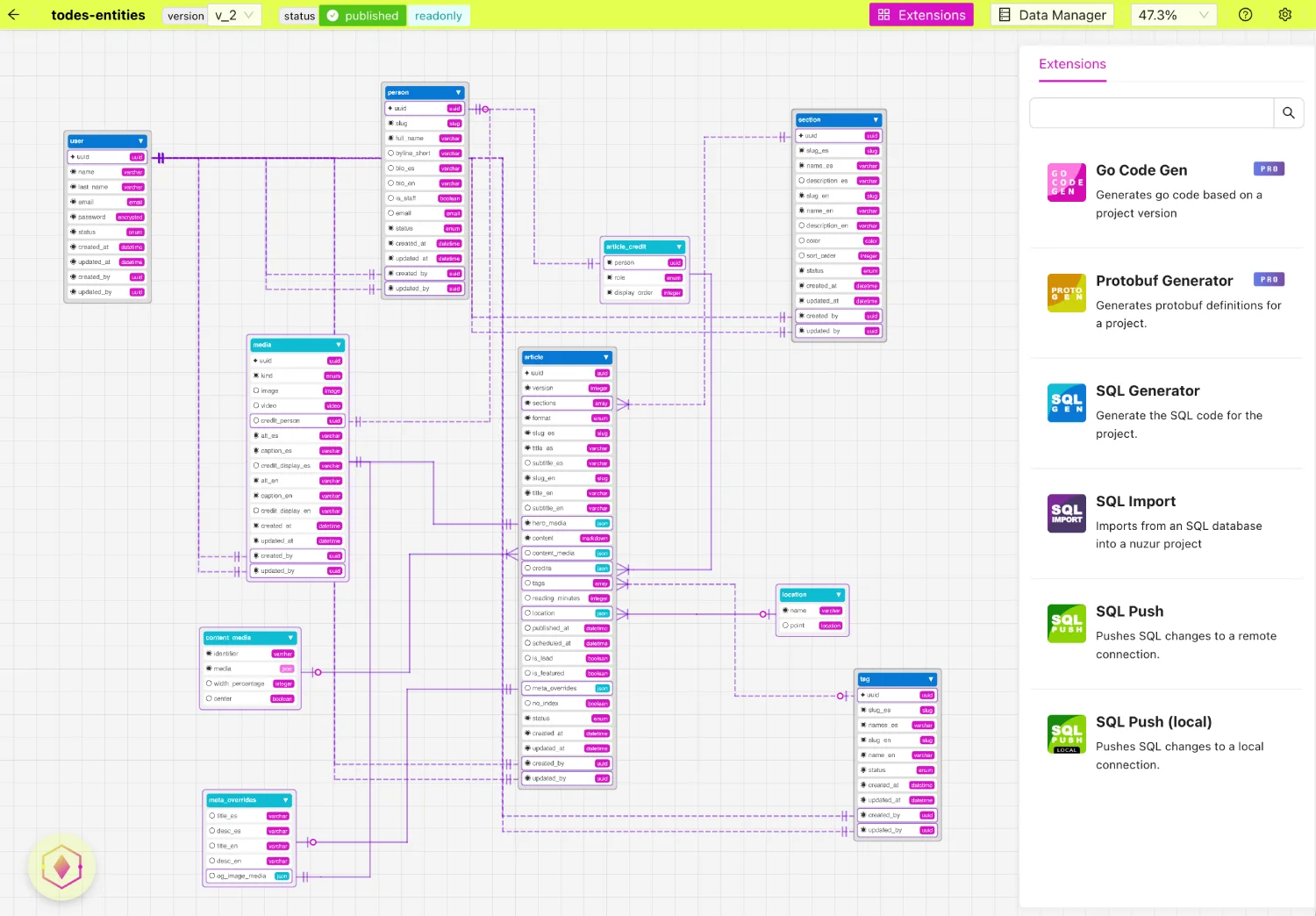 **It's visual and model-centric.** Instead of a connection tree, you see your schema as a model — entities, fields, relationships — laid out so you can understand the shape of a database at a glance. On a database you didn't design yourself, that "see the whole thing" view is worth a lot.
**It's web-first and light.** DBeaver's main product is a desktop install on Eclipse; CloudBeaver exists, but the flagship experience is native. nuzur is a **web application** you just open — nothing to install on any platform. If DBeaver has ever felt heavy to you, that alone is a reason to try nuzur. And if you're wondering how a browser-based tool reaches a database on your own machine, that's what [**local agents**](/docs/local-agent) are for — a small local component that lets nuzur connect to your local or private-network databases. It's a couple of extra setup steps, but "web-based" doesn't shut you out of local development.
**You can bring an existing database under it.** Point nuzur at what you already have, import the schema, and query it. You don't have to start greenfield to evaluate it — you can try it against your real database on day one.
## How do nuzur and DBeaver compare for teams?
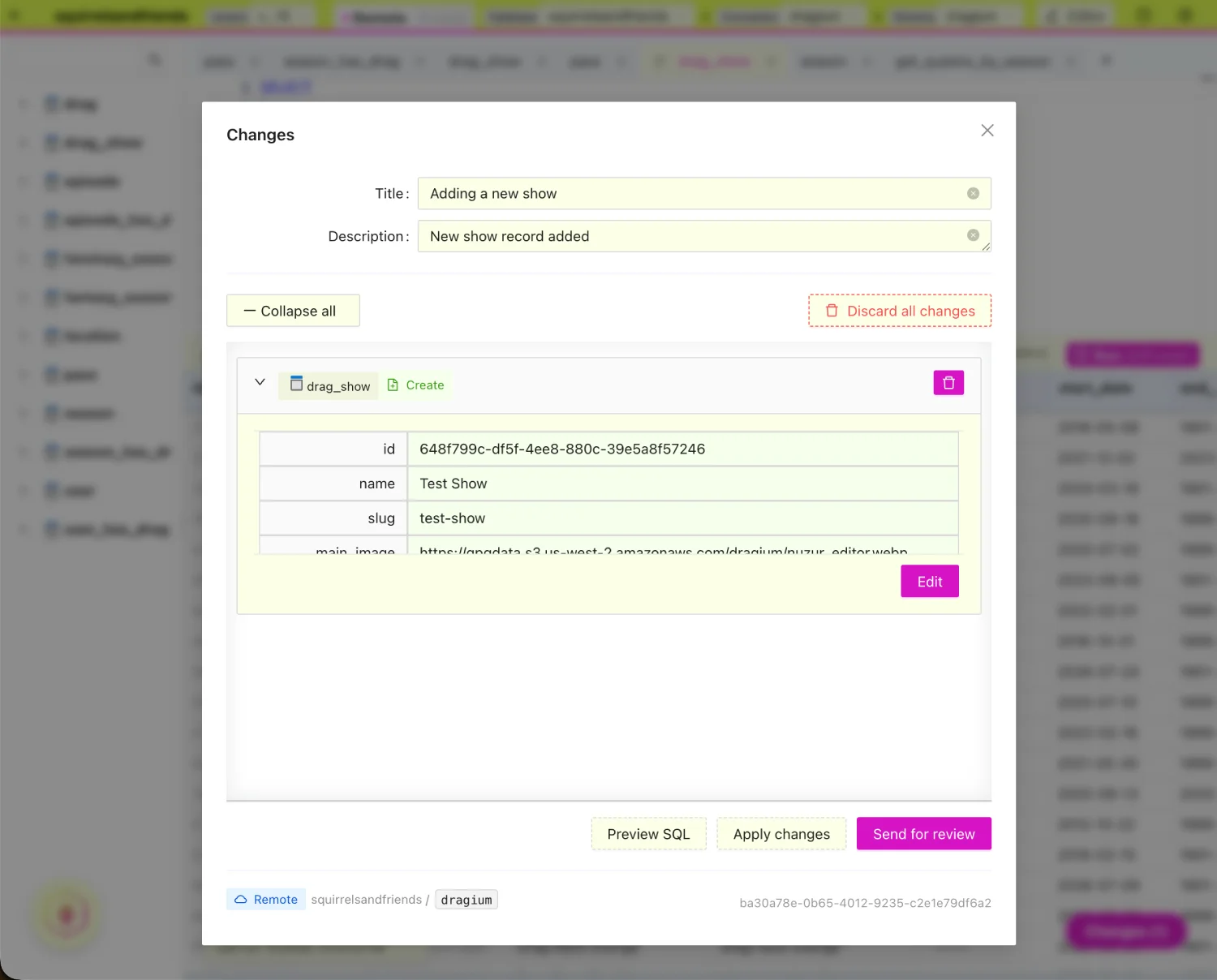
This is where nuzur's model-first design pays off in a way that's hard to replicate with a pure client. Because the model is **versioned**, changes don't have to be applied straight to the database and hoped for. You can propose a change as a **change request**, submit it for review, and have a teammate approve it before anything ships — essentially a pull-request workflow for your database. And this covers **both schema changes and data changes**: not just "add this column," but "update these rows."
That's worth sitting with, because it adds a dimension the data grid alone doesn't. nuzur can edit data directly, like DBeaver — but it can *also* route changes through review before they land. On a shared or production database, editing a cell and having it instantly committed is fast, but it's also how mistakes happen. Being able to gate changes behind review is a governance capability a pure client doesn't offer, and nuzur lets you pick per situation rather than forcing one mode.
To be fair to DBeaver: its team story is real, but it's a different one. DBeaver Team Edition and CloudBeaver Enterprise focus on **shared connections, access permissions, single sign-on, and audit logging** — controlling who can reach which database and keeping a timestamped record of what happened.
So the two approaches complement each other: DBeaver governs *access* to live databases, while nuzur governs the *changes* — schema or data — before they land.
**It's visual and model-centric.** Instead of a connection tree, you see your schema as a model — entities, fields, relationships — laid out so you can understand the shape of a database at a glance. On a database you didn't design yourself, that "see the whole thing" view is worth a lot.
**It's web-first and light.** DBeaver's main product is a desktop install on Eclipse; CloudBeaver exists, but the flagship experience is native. nuzur is a **web application** you just open — nothing to install on any platform. If DBeaver has ever felt heavy to you, that alone is a reason to try nuzur. And if you're wondering how a browser-based tool reaches a database on your own machine, that's what [**local agents**](/docs/local-agent) are for — a small local component that lets nuzur connect to your local or private-network databases. It's a couple of extra setup steps, but "web-based" doesn't shut you out of local development.
**You can bring an existing database under it.** Point nuzur at what you already have, import the schema, and query it. You don't have to start greenfield to evaluate it — you can try it against your real database on day one.
## How do nuzur and DBeaver compare for teams?
This is where nuzur's model-first design pays off in a way that's hard to replicate with a pure client. Because the model is **versioned**, changes don't have to be applied straight to the database and hoped for. You can propose a change as a **change request**, submit it for review, and have a teammate approve it before anything ships — essentially a pull-request workflow for your database. And this covers **both schema changes and data changes**: not just "add this column," but "update these rows."
That's worth sitting with, because it adds a dimension the data grid alone doesn't. nuzur can edit data directly, like DBeaver — but it can *also* route changes through review before they land. On a shared or production database, editing a cell and having it instantly committed is fast, but it's also how mistakes happen. Being able to gate changes behind review is a governance capability a pure client doesn't offer, and nuzur lets you pick per situation rather than forcing one mode.
To be fair to DBeaver: its team story is real, but it's a different one. DBeaver Team Edition and CloudBeaver Enterprise focus on **shared connections, access permissions, single sign-on, and audit logging** — controlling who can reach which database and keeping a timestamped record of what happened.
So the two approaches complement each other: DBeaver governs *access* to live databases, while nuzur governs the *changes* — schema or data — before they land.
 ## How do nuzur and DBeaver handle ER diagrams?
Both tools draw diagrams, but in opposite directions. DBeaver generates an **ER diagram** by *reverse-engineering* an existing schema — point it at a live database and it draws what's there (with an edit mode in the Ultimate tier). It's great for understanding or documenting a database you inherited.
In nuzur, the visual model runs *forward*. You design entities, fields, and relationships — or import them — and that model becomes the single source of truth. It isn't just a picture of the database; it's the thing the database is kept in sync with. If you're evaluating any **ER diagram tool**, the question worth asking is what the diagram is actually *for*: documentation, or a source of truth that drives real output.
## Do nuzur and DBeaver support AI and MCP?
Both tools have a modern AI story, and they're closer than you might guess.
DBeaver Community includes a basic **AI SQL generation** feature — type a request in plain English and it writes the SQL. The fuller **AI Assistant** and AI Chat live in the paid tiers, which can also connect external **MCP servers**. And DBeaver's CLI (`dbvr`, free and open source) along with CloudBeaver Enterprise and Team Edition can themselves *act as MCP servers*, so your own AI can connect and query the database.
nuzur matches this from both directions. On team plans it has its own **AI assistant** that can help write SQL queries and — because everything is model-first — make changes to the model itself, not just generate text. And nuzur exposes an [**MCP server**](/docs/mcp-connect), so the AI client you already use can connect, understand your model, and query your database.
The honest takeaway: this is roughly parity. Both give you an embedded assistant, and both speak MCP. The one genuinely different note is that nuzur's assistant acts on your *model* — it can propose structural changes, not only SQL — which follows from nuzur being model-first rather than a query console.
## More than a client
There's one thing nuzur does that DBeaver doesn't, and I'll keep it brief because it's a whole separate topic: nuzur can **generate** from your model. From one visual model it produces SQL migrations, an API, and server scaffolding, deterministically — the same model in, the same code out. DBeaver is a client for databases that already exist; nuzur can also be the place the backend around them starts. If that sounds interesting, there's a lot more to explore, but it isn't the point of this comparison.
## Which should you use?
**Use DBeaver if** you juggle many different databases, you want the deepest possible data-grid and admin features, you basically live in SQL all day, and you want a free, mature, do-everything client. It's the right call, and I'd tell you so.
**Use nuzur if** you want a cleaner, visual, model-first way to understand and work with your database, you'd rather work in the browser than in a heavy desktop app, you like the idea of your schema being something you design and see — not just connect to — and you want changes your team can propose and review — schema *and* data — before they ship.
And honestly? A lot of people will use both. Model and explore visually in nuzur; drop into DBeaver when you need its heavy data tooling. They're not mutually exclusive — and I'd rather you pick the right tool than the one with my name on it.
## Frequently Asked Questions
### Is nuzur a good DBeaver alternative?
For MySQL and PostgreSQL, yes — especially if you want visual data modeling, a web-based tool with nothing to install, and team review of changes. If you need to connect to many different database types or want the deepest data-grid and admin tooling, DBeaver is still the stronger choice.
### What databases does nuzur support?
nuzur currently supports MySQL and PostgreSQL. DBeaver connects to 100+ databases through JDBC.
### Can nuzur connect to a local database?
Yes. Because nuzur is web-based, it uses a [local agent](/docs/local-agent) — a small local component that lets it reach databases running on your own machine or private network. It takes a little extra setup, but local development is fully supported.
### Does nuzur have an AI assistant like DBeaver?
Yes. On team plans, nuzur includes an AI assistant that can help write SQL queries and make changes to your model directly. nuzur also exposes an MCP server, so the AI client you already use can connect and query your database.
### Can teams review changes before they hit the database in nuzur?
Yes. nuzur uses change requests — you propose a change, submit it for review, and a teammate approves it before it ships. This covers both schema changes and data changes.
### Can nuzur replace DBeaver?
It depends on your workflow. For designing, modeling, reviewing, and generating a backend on MySQL or PostgreSQL, nuzur can be your main tool. For heavy, direct data administration across many database types, DBeaver is hard to replace — and plenty of developers use both together.
### Is nuzur free?
Yes. The **Starter** plan is free forever (up to 3 projects, schema editor, and metered code generation). **PRO** ($19/mo) unlocks unlimited projects and generation plus the MCP connector, and **Team** ($29/mo per user) adds multi-user collaboration, change-request reviews, and AI assistants — see [pricing](/pricing). DBeaver's Community edition is free and open source, with paid Lite, Enterprise, and Ultimate tiers.
## How do nuzur and DBeaver handle ER diagrams?
Both tools draw diagrams, but in opposite directions. DBeaver generates an **ER diagram** by *reverse-engineering* an existing schema — point it at a live database and it draws what's there (with an edit mode in the Ultimate tier). It's great for understanding or documenting a database you inherited.
In nuzur, the visual model runs *forward*. You design entities, fields, and relationships — or import them — and that model becomes the single source of truth. It isn't just a picture of the database; it's the thing the database is kept in sync with. If you're evaluating any **ER diagram tool**, the question worth asking is what the diagram is actually *for*: documentation, or a source of truth that drives real output.
## Do nuzur and DBeaver support AI and MCP?
Both tools have a modern AI story, and they're closer than you might guess.
DBeaver Community includes a basic **AI SQL generation** feature — type a request in plain English and it writes the SQL. The fuller **AI Assistant** and AI Chat live in the paid tiers, which can also connect external **MCP servers**. And DBeaver's CLI (`dbvr`, free and open source) along with CloudBeaver Enterprise and Team Edition can themselves *act as MCP servers*, so your own AI can connect and query the database.
nuzur matches this from both directions. On team plans it has its own **AI assistant** that can help write SQL queries and — because everything is model-first — make changes to the model itself, not just generate text. And nuzur exposes an [**MCP server**](/docs/mcp-connect), so the AI client you already use can connect, understand your model, and query your database.
The honest takeaway: this is roughly parity. Both give you an embedded assistant, and both speak MCP. The one genuinely different note is that nuzur's assistant acts on your *model* — it can propose structural changes, not only SQL — which follows from nuzur being model-first rather than a query console.
## More than a client
There's one thing nuzur does that DBeaver doesn't, and I'll keep it brief because it's a whole separate topic: nuzur can **generate** from your model. From one visual model it produces SQL migrations, an API, and server scaffolding, deterministically — the same model in, the same code out. DBeaver is a client for databases that already exist; nuzur can also be the place the backend around them starts. If that sounds interesting, there's a lot more to explore, but it isn't the point of this comparison.
## Which should you use?
**Use DBeaver if** you juggle many different databases, you want the deepest possible data-grid and admin features, you basically live in SQL all day, and you want a free, mature, do-everything client. It's the right call, and I'd tell you so.
**Use nuzur if** you want a cleaner, visual, model-first way to understand and work with your database, you'd rather work in the browser than in a heavy desktop app, you like the idea of your schema being something you design and see — not just connect to — and you want changes your team can propose and review — schema *and* data — before they ship.
And honestly? A lot of people will use both. Model and explore visually in nuzur; drop into DBeaver when you need its heavy data tooling. They're not mutually exclusive — and I'd rather you pick the right tool than the one with my name on it.
## Frequently Asked Questions
### Is nuzur a good DBeaver alternative?
For MySQL and PostgreSQL, yes — especially if you want visual data modeling, a web-based tool with nothing to install, and team review of changes. If you need to connect to many different database types or want the deepest data-grid and admin tooling, DBeaver is still the stronger choice.
### What databases does nuzur support?
nuzur currently supports MySQL and PostgreSQL. DBeaver connects to 100+ databases through JDBC.
### Can nuzur connect to a local database?
Yes. Because nuzur is web-based, it uses a [local agent](/docs/local-agent) — a small local component that lets it reach databases running on your own machine or private network. It takes a little extra setup, but local development is fully supported.
### Does nuzur have an AI assistant like DBeaver?
Yes. On team plans, nuzur includes an AI assistant that can help write SQL queries and make changes to your model directly. nuzur also exposes an MCP server, so the AI client you already use can connect and query your database.
### Can teams review changes before they hit the database in nuzur?
Yes. nuzur uses change requests — you propose a change, submit it for review, and a teammate approves it before it ships. This covers both schema changes and data changes.
### Can nuzur replace DBeaver?
It depends on your workflow. For designing, modeling, reviewing, and generating a backend on MySQL or PostgreSQL, nuzur can be your main tool. For heavy, direct data administration across many database types, DBeaver is hard to replace — and plenty of developers use both together.
### Is nuzur free?
Yes. The **Starter** plan is free forever (up to 3 projects, schema editor, and metered code generation). **PRO** ($19/mo) unlocks unlimited projects and generation plus the MCP connector, and **Team** ($29/mo per user) adds multi-user collaboration, change-request reviews, and AI assistants — see [pricing](/pricing). DBeaver's Community edition is free and open source, with paid Lite, Enterprise, and Ultimate tiers.