---
title: "System Design for Beginners: How I Architected nuzur's Backend (and What I'd Change)"
date: "2026-06-22"
author: "Maykel Farha"
excerpt: "Three years ago, this was a plan. Today it's a real, running system. I'll walk you through nuzur's real backend architecture layer by layer — what I chose, why I chose it, and four things I would change if I started over."
slug: "nuzur-architecture"
image: "/blog-images/nuzur-architecture-thumb.webp"
---
# How I Architected nuzur's Backend (and What I'd Change)
Three years ago, the plan was just a sketch in a notebook, today it's a real, running system. I'll walk you through the real architecture behind nuzur, layer by layer. And at the end, I'll share four things I would change if I started over.
---
Check out the video version here:
---
## Quick context
[nuzur](https://nuzur.com) is a visual database modeling tool. You design your schema as a diagram — tables, fields, relationships — and nuzur generates the boring parts from it: the SQL migrations, the CRUD operations, the list operations, the whole entity management module in Go. You write your business logic on top of that.
The whole philosophy is **model-first**. Your schema is the source of truth, and everything downstream is derived from it.
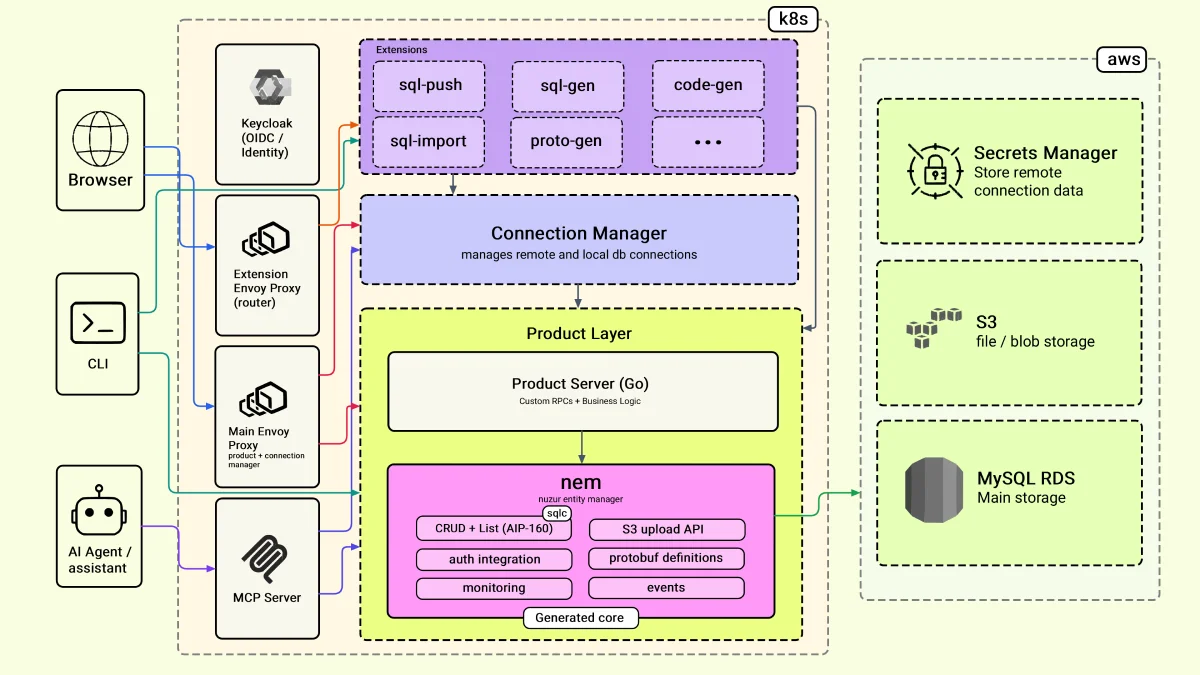
Here is the system at a glance. We'll go through it one layer at a time, and for each I'll tell you what I chose, why, and what I'd change.
---
## Layer 1: The edge
These are the components the end user interacts with directly.
### The web application
The web app is in React. The first thing that trips people off is using gRPC with the browser. Browsers don't natively understand gRPC, so there is a translation layer in the middle: [Envoy](https://www.envoyproxy.io). Envoy translates from native gRPC to gRPC-Web, which the browser can actually consume.
It sounds like overkill — and it is a trade-off — but the payoff is a consistent IDL definition across all layers. I have a single protobuf at the product layer, and it's the same one I use at the frontend. It keeps everything consistent.
### The CLI tool
The CLI tool is written in Go. I'm using a library called [urfave/cli](https://github.com/urfave/cli), which is straightforward and gives you everything you need without too much ceremony. Since the CLI is also Go, I can make my gRPC calls directly — no Envoy layer needed here.
I'm using [GoReleaser](https://goreleaser.com) to package the CLI into binaries for different operating systems.
The CLI enables a couple of things that the web app doesn't. Users can run extensions and generate code directly into their local file system. They can also open a WebSocket connection from their machine to the nuzur backend to connect to a local database for testing.
### AI agents and the MCP server
This is the newer way of interacting with nuzur. I added an MCP server — think of it as a translation layer, the same role Envoy plays for the web layer, but for AI assistants.
The MCP server is written in Go using the official Go SDK. It wraps the nuzur actions as tools and exposes them through the standard MCP protocol.
The part I struggled with most was authentication. In the browser, you have a token stored locally. In an MCP context, there's no browser — so I had to manage token tracking and reissuance on the nuzur side. It took some time to get right, but once it's in place, it adds very useful functionality: users can interact with their nuzur projects directly through Claude or any MCP-compatible AI assistant.
You can find the [nuzur MCP connector here](https://nuzur.com/blog/nuzur-claude-mcp).
---
## Layer 2: The generated core and the product layer
There's a common misconception about code generation: *won't my code be overwritten every time I regenerate?*
The way I handle this is the most important architectural decision in nuzur. Let me explain it.
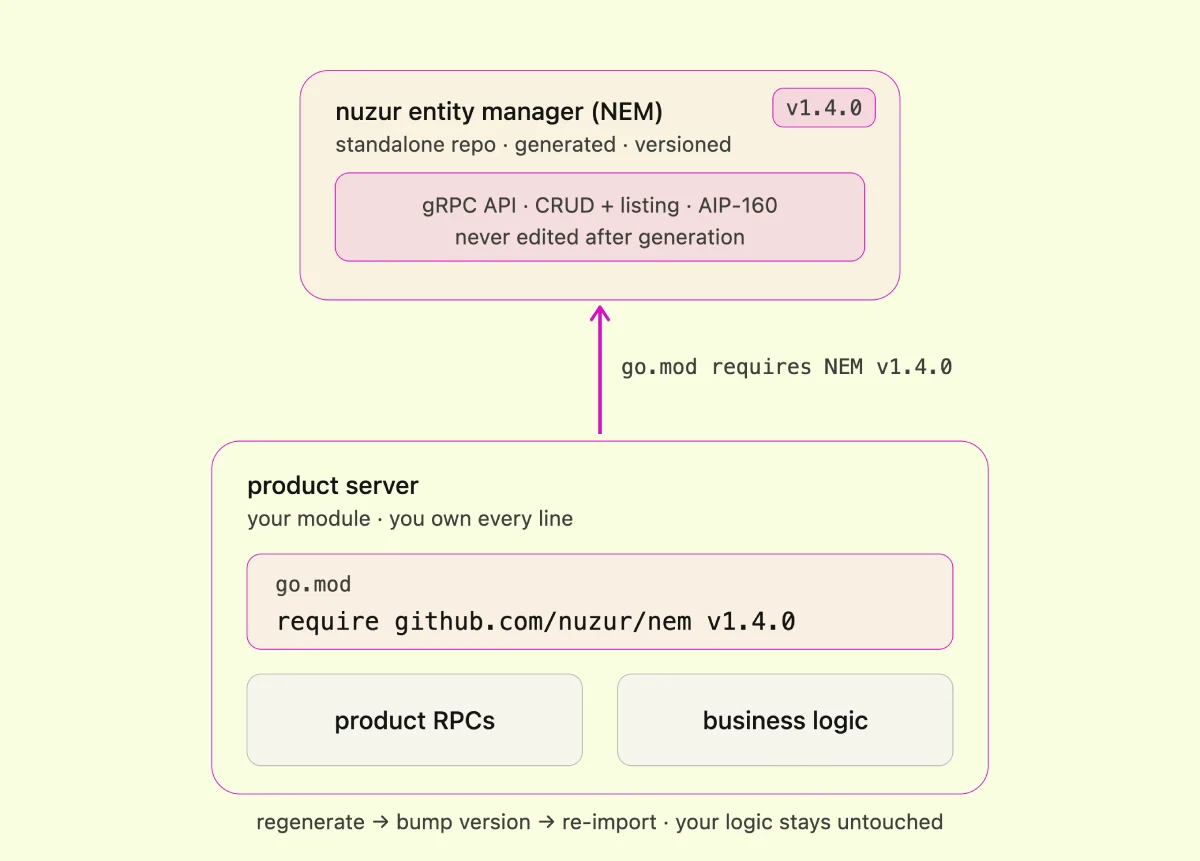
nuzur generates a repo called **NEM** — the nuzur Entity Manager. NEM is a standalone, versioned Go module in its own repository. It contains all the generated code: the gRPC API definitions, all the CRUD operations, and the list operations (with [AIP-160](https://google.aip.dev/160) filtering baked in).
Here's the key: **I never touch NEM directly**. I include it in my product server as a Go module, just like any other dependency. In the product server, I define my actual product RPCs — the ones I own — where my real business logic lives. NEM and the product server never share a single file.
Whenever my model changes, I regenerate NEM, bump the version, import it into the product server, and move on. My business logic is untouched.
The one rule: once in production, don't make breaking changes. No removing fields already in use. Just add to the bottom. That keeps everything backwards compatible.
**The philosophy is: generate the core, hand-write (or AI-write) the edge.**
### The connection manager
The connection manager is a separate module — intentionally. It handles all the open connections to databases and local machines, so it's more resource-intensive than the rest of the product layer. I kept it separate so it can scale independently if and when nuzur grows.
---
## Layer 3: Extensions
Extensions are where the actual generation happens. Each extension lives in its own pod and exposes its own API. The core orchestrates; the extensions do the work.
**Why this design?**
- **Isolation.** A pod can crash, get redeployed, or behave unpredictably — none of that impacts the product. That was my main concern going into it.
- **Independent scaling.** One extension might be much heavier on resources than another. Running them separately means I can size them independently.
- **Language flexibility.** Since the boundary is an API, extensions can be written in different languages. The door is open.
---
## Layer 4: Auth
I did not build my own authentication server. I'm using [Keycloak](https://www.keycloak.org), an open-source identity provider that handles login, token issuance, and user management. It's OIDC-compatible, so integrating Google or GitHub login is straightforward.
The decision was simple: building a really good auth server is a complex, risky project. Keycloak is well-maintained, has an active community, and handles edge cases I don't want to think about.
It does come with trade-offs, which I'll cover below.
---
## Layer 5: Deployment
Everything runs on **Kubernetes**, and I use **Helm** for packaging and deployment. Helm lets you keep all your configurations in your Git repository — what image to use, what resources, everything tracked and versioned. I find it extremely useful.
For data:
- **Database**: MySQL on [AWS RDS](https://aws.amazon.com/rds/) — reliable, handles backups and failovers, low cost to start
- **File storage**: AWS S3
- **Secrets**: AWS Secrets Manager
My Kubernetes cluster runs on [Linode (Akamai Cloud)](https://www.linode.com), while my database is on AWS. The reason was cost — Linode has better and more predictable pricing. But as you'll see in the next section, that came with a real cost of its own.
---
## 4 things I would change
### 1. gRPC on the web
I don't regret the outcome — having consistent proto definitions across all layers is clean and worth it. But setting up gRPC-Web with React was genuinely painful. I spent several days fighting it before the AI era, doing everything by hand. I'd still choose it, but I'd do it differently and I imagine it's easier to set up now.
### 2. Two different clouds
Running Kubernetes on Linode and the database on AWS made sense for cost, but it introduced latency I didn't anticipate. I had to make compensating improvements, and getting RDS to work correctly outside of its VPC was a multi-hour fight.
**If I started over: keep everything on a single cloud for as long as possible.** It's simpler, faster, and avoids a class of infrastructure headaches.
### 3. Keycloak
Keycloak has worked. But it's been hard to customize. If I want to change anything — like simplifying the registration form — I have to write a Java provider. It's also heavier on resources than I expected for what it does.
I'd explore alternatives. Some cost money, which Keycloak doesn't, so it's a real trade-off. But I'd at least evaluate the options more carefully before committing.
### 4. One pod per extension
I still stand by the idea — isolation and independent scaling are real benefits. But I think I implemented it too early. **Starting again, I'd run all extensions in a single pod and separate them out only when needed.** The overhead of managing individual pods — especially keeping a shared library in sync across all of them — adds up. I'd earn that complexity rather than start with it.
---
## Wrapping up
Here's the full stack at a glance:
- **Frontend**: React + gRPC-Web
- **Proxy**: Envoy (gRPC-Web translation)
- **CLI**: Go + urfave/cli + GoReleaser
- **AI layer**: Go MCP server
- **Generated core**: NEM (versioned Go module, gRPC + CRUD + AIP-160)
- **Product server**: Go (business logic, product RPCs)
- **Extensions**: Go, pod-per-extension
- **Auth**: Keycloak (OIDC)
- **Deployment**: Kubernetes + Helm on Linode
- **Database**: MySQL on AWS RDS
- **Storage**: AWS S3
- **Secrets**: AWS Secrets Manager
The four regrets — gRPC-Web setup complexity, split-cloud latency, Keycloak rigidity, and premature extension isolation — are all things I'd still choose again with more information. They just come with a cost I'd want to account for earlier.
 ---
## Layer 1: The edge
These are the components the end user interacts with directly.
### The web application
The web app is in React. The first thing that trips people off is using gRPC with the browser. Browsers don't natively understand gRPC, so there is a translation layer in the middle: [Envoy](https://www.envoyproxy.io). Envoy translates from native gRPC to gRPC-Web, which the browser can actually consume.
It sounds like overkill — and it is a trade-off — but the payoff is a consistent IDL definition across all layers. I have a single protobuf at the product layer, and it's the same one I use at the frontend. It keeps everything consistent.
### The CLI tool
The CLI tool is written in Go. I'm using a library called [urfave/cli](https://github.com/urfave/cli), which is straightforward and gives you everything you need without too much ceremony. Since the CLI is also Go, I can make my gRPC calls directly — no Envoy layer needed here.
I'm using [GoReleaser](https://goreleaser.com) to package the CLI into binaries for different operating systems.
The CLI enables a couple of things that the web app doesn't. Users can run extensions and generate code directly into their local file system. They can also open a WebSocket connection from their machine to the nuzur backend to connect to a local database for testing.
### AI agents and the MCP server
This is the newer way of interacting with nuzur. I added an MCP server — think of it as a translation layer, the same role Envoy plays for the web layer, but for AI assistants.
The MCP server is written in Go using the official Go SDK. It wraps the nuzur actions as tools and exposes them through the standard MCP protocol.
The part I struggled with most was authentication. In the browser, you have a token stored locally. In an MCP context, there's no browser — so I had to manage token tracking and reissuance on the nuzur side. It took some time to get right, but once it's in place, it adds very useful functionality: users can interact with their nuzur projects directly through Claude or any MCP-compatible AI assistant.
You can find the [nuzur MCP connector here](https://nuzur.com/blog/nuzur-claude-mcp).
---
## Layer 2: The generated core and the product layer
There's a common misconception about code generation: *won't my code be overwritten every time I regenerate?*
The way I handle this is the most important architectural decision in nuzur. Let me explain it.
nuzur generates a repo called **NEM** — the nuzur Entity Manager. NEM is a standalone, versioned Go module in its own repository. It contains all the generated code: the gRPC API definitions, all the CRUD operations, and the list operations (with [AIP-160](https://google.aip.dev/160) filtering baked in).
Here's the key: **I never touch NEM directly**. I include it in my product server as a Go module, just like any other dependency. In the product server, I define my actual product RPCs — the ones I own — where my real business logic lives. NEM and the product server never share a single file.
Whenever my model changes, I regenerate NEM, bump the version, import it into the product server, and move on. My business logic is untouched.
The one rule: once in production, don't make breaking changes. No removing fields already in use. Just add to the bottom. That keeps everything backwards compatible.
**The philosophy is: generate the core, hand-write (or AI-write) the edge.**
---
## Layer 1: The edge
These are the components the end user interacts with directly.
### The web application
The web app is in React. The first thing that trips people off is using gRPC with the browser. Browsers don't natively understand gRPC, so there is a translation layer in the middle: [Envoy](https://www.envoyproxy.io). Envoy translates from native gRPC to gRPC-Web, which the browser can actually consume.
It sounds like overkill — and it is a trade-off — but the payoff is a consistent IDL definition across all layers. I have a single protobuf at the product layer, and it's the same one I use at the frontend. It keeps everything consistent.
### The CLI tool
The CLI tool is written in Go. I'm using a library called [urfave/cli](https://github.com/urfave/cli), which is straightforward and gives you everything you need without too much ceremony. Since the CLI is also Go, I can make my gRPC calls directly — no Envoy layer needed here.
I'm using [GoReleaser](https://goreleaser.com) to package the CLI into binaries for different operating systems.
The CLI enables a couple of things that the web app doesn't. Users can run extensions and generate code directly into their local file system. They can also open a WebSocket connection from their machine to the nuzur backend to connect to a local database for testing.
### AI agents and the MCP server
This is the newer way of interacting with nuzur. I added an MCP server — think of it as a translation layer, the same role Envoy plays for the web layer, but for AI assistants.
The MCP server is written in Go using the official Go SDK. It wraps the nuzur actions as tools and exposes them through the standard MCP protocol.
The part I struggled with most was authentication. In the browser, you have a token stored locally. In an MCP context, there's no browser — so I had to manage token tracking and reissuance on the nuzur side. It took some time to get right, but once it's in place, it adds very useful functionality: users can interact with their nuzur projects directly through Claude or any MCP-compatible AI assistant.
You can find the [nuzur MCP connector here](https://nuzur.com/blog/nuzur-claude-mcp).
---
## Layer 2: The generated core and the product layer
There's a common misconception about code generation: *won't my code be overwritten every time I regenerate?*
The way I handle this is the most important architectural decision in nuzur. Let me explain it.
nuzur generates a repo called **NEM** — the nuzur Entity Manager. NEM is a standalone, versioned Go module in its own repository. It contains all the generated code: the gRPC API definitions, all the CRUD operations, and the list operations (with [AIP-160](https://google.aip.dev/160) filtering baked in).
Here's the key: **I never touch NEM directly**. I include it in my product server as a Go module, just like any other dependency. In the product server, I define my actual product RPCs — the ones I own — where my real business logic lives. NEM and the product server never share a single file.
Whenever my model changes, I regenerate NEM, bump the version, import it into the product server, and move on. My business logic is untouched.
The one rule: once in production, don't make breaking changes. No removing fields already in use. Just add to the bottom. That keeps everything backwards compatible.
**The philosophy is: generate the core, hand-write (or AI-write) the edge.**
 ### The connection manager
The connection manager is a separate module — intentionally. It handles all the open connections to databases and local machines, so it's more resource-intensive than the rest of the product layer. I kept it separate so it can scale independently if and when nuzur grows.
---
## Layer 3: Extensions
Extensions are where the actual generation happens. Each extension lives in its own pod and exposes its own API. The core orchestrates; the extensions do the work.
**Why this design?**
- **Isolation.** A pod can crash, get redeployed, or behave unpredictably — none of that impacts the product. That was my main concern going into it.
- **Independent scaling.** One extension might be much heavier on resources than another. Running them separately means I can size them independently.
- **Language flexibility.** Since the boundary is an API, extensions can be written in different languages. The door is open.
---
## Layer 4: Auth
I did not build my own authentication server. I'm using [Keycloak](https://www.keycloak.org), an open-source identity provider that handles login, token issuance, and user management. It's OIDC-compatible, so integrating Google or GitHub login is straightforward.
The decision was simple: building a really good auth server is a complex, risky project. Keycloak is well-maintained, has an active community, and handles edge cases I don't want to think about.
It does come with trade-offs, which I'll cover below.
---
## Layer 5: Deployment
Everything runs on **Kubernetes**, and I use **Helm** for packaging and deployment. Helm lets you keep all your configurations in your Git repository — what image to use, what resources, everything tracked and versioned. I find it extremely useful.
For data:
- **Database**: MySQL on [AWS RDS](https://aws.amazon.com/rds/) — reliable, handles backups and failovers, low cost to start
- **File storage**: AWS S3
- **Secrets**: AWS Secrets Manager
My Kubernetes cluster runs on [Linode (Akamai Cloud)](https://www.linode.com), while my database is on AWS. The reason was cost — Linode has better and more predictable pricing. But as you'll see in the next section, that came with a real cost of its own.
---
## 4 things I would change
### 1. gRPC on the web
I don't regret the outcome — having consistent proto definitions across all layers is clean and worth it. But setting up gRPC-Web with React was genuinely painful. I spent several days fighting it before the AI era, doing everything by hand. I'd still choose it, but I'd do it differently and I imagine it's easier to set up now.
### 2. Two different clouds
Running Kubernetes on Linode and the database on AWS made sense for cost, but it introduced latency I didn't anticipate. I had to make compensating improvements, and getting RDS to work correctly outside of its VPC was a multi-hour fight.
**If I started over: keep everything on a single cloud for as long as possible.** It's simpler, faster, and avoids a class of infrastructure headaches.
### 3. Keycloak
Keycloak has worked. But it's been hard to customize. If I want to change anything — like simplifying the registration form — I have to write a Java provider. It's also heavier on resources than I expected for what it does.
I'd explore alternatives. Some cost money, which Keycloak doesn't, so it's a real trade-off. But I'd at least evaluate the options more carefully before committing.
### 4. One pod per extension
I still stand by the idea — isolation and independent scaling are real benefits. But I think I implemented it too early. **Starting again, I'd run all extensions in a single pod and separate them out only when needed.** The overhead of managing individual pods — especially keeping a shared library in sync across all of them — adds up. I'd earn that complexity rather than start with it.
---
## Wrapping up
Here's the full stack at a glance:
- **Frontend**: React + gRPC-Web
- **Proxy**: Envoy (gRPC-Web translation)
- **CLI**: Go + urfave/cli + GoReleaser
- **AI layer**: Go MCP server
- **Generated core**: NEM (versioned Go module, gRPC + CRUD + AIP-160)
- **Product server**: Go (business logic, product RPCs)
- **Extensions**: Go, pod-per-extension
- **Auth**: Keycloak (OIDC)
- **Deployment**: Kubernetes + Helm on Linode
- **Database**: MySQL on AWS RDS
- **Storage**: AWS S3
- **Secrets**: AWS Secrets Manager
The four regrets — gRPC-Web setup complexity, split-cloud latency, Keycloak rigidity, and premature extension isolation — are all things I'd still choose again with more information. They just come with a cost I'd want to account for earlier.
### The connection manager
The connection manager is a separate module — intentionally. It handles all the open connections to databases and local machines, so it's more resource-intensive than the rest of the product layer. I kept it separate so it can scale independently if and when nuzur grows.
---
## Layer 3: Extensions
Extensions are where the actual generation happens. Each extension lives in its own pod and exposes its own API. The core orchestrates; the extensions do the work.
**Why this design?**
- **Isolation.** A pod can crash, get redeployed, or behave unpredictably — none of that impacts the product. That was my main concern going into it.
- **Independent scaling.** One extension might be much heavier on resources than another. Running them separately means I can size them independently.
- **Language flexibility.** Since the boundary is an API, extensions can be written in different languages. The door is open.
---
## Layer 4: Auth
I did not build my own authentication server. I'm using [Keycloak](https://www.keycloak.org), an open-source identity provider that handles login, token issuance, and user management. It's OIDC-compatible, so integrating Google or GitHub login is straightforward.
The decision was simple: building a really good auth server is a complex, risky project. Keycloak is well-maintained, has an active community, and handles edge cases I don't want to think about.
It does come with trade-offs, which I'll cover below.
---
## Layer 5: Deployment
Everything runs on **Kubernetes**, and I use **Helm** for packaging and deployment. Helm lets you keep all your configurations in your Git repository — what image to use, what resources, everything tracked and versioned. I find it extremely useful.
For data:
- **Database**: MySQL on [AWS RDS](https://aws.amazon.com/rds/) — reliable, handles backups and failovers, low cost to start
- **File storage**: AWS S3
- **Secrets**: AWS Secrets Manager
My Kubernetes cluster runs on [Linode (Akamai Cloud)](https://www.linode.com), while my database is on AWS. The reason was cost — Linode has better and more predictable pricing. But as you'll see in the next section, that came with a real cost of its own.
---
## 4 things I would change
### 1. gRPC on the web
I don't regret the outcome — having consistent proto definitions across all layers is clean and worth it. But setting up gRPC-Web with React was genuinely painful. I spent several days fighting it before the AI era, doing everything by hand. I'd still choose it, but I'd do it differently and I imagine it's easier to set up now.
### 2. Two different clouds
Running Kubernetes on Linode and the database on AWS made sense for cost, but it introduced latency I didn't anticipate. I had to make compensating improvements, and getting RDS to work correctly outside of its VPC was a multi-hour fight.
**If I started over: keep everything on a single cloud for as long as possible.** It's simpler, faster, and avoids a class of infrastructure headaches.
### 3. Keycloak
Keycloak has worked. But it's been hard to customize. If I want to change anything — like simplifying the registration form — I have to write a Java provider. It's also heavier on resources than I expected for what it does.
I'd explore alternatives. Some cost money, which Keycloak doesn't, so it's a real trade-off. But I'd at least evaluate the options more carefully before committing.
### 4. One pod per extension
I still stand by the idea — isolation and independent scaling are real benefits. But I think I implemented it too early. **Starting again, I'd run all extensions in a single pod and separate them out only when needed.** The overhead of managing individual pods — especially keeping a shared library in sync across all of them — adds up. I'd earn that complexity rather than start with it.
---
## Wrapping up
Here's the full stack at a glance:
- **Frontend**: React + gRPC-Web
- **Proxy**: Envoy (gRPC-Web translation)
- **CLI**: Go + urfave/cli + GoReleaser
- **AI layer**: Go MCP server
- **Generated core**: NEM (versioned Go module, gRPC + CRUD + AIP-160)
- **Product server**: Go (business logic, product RPCs)
- **Extensions**: Go, pod-per-extension
- **Auth**: Keycloak (OIDC)
- **Deployment**: Kubernetes + Helm on Linode
- **Database**: MySQL on AWS RDS
- **Storage**: AWS S3
- **Secrets**: AWS Secrets Manager
The four regrets — gRPC-Web setup complexity, split-cloud latency, Keycloak rigidity, and premature extension isolation — are all things I'd still choose again with more information. They just come with a cost I'd want to account for earlier.